
Instagram: Business Account
August 2, 2022
Share this content
How do you know if your account is a Business Account?
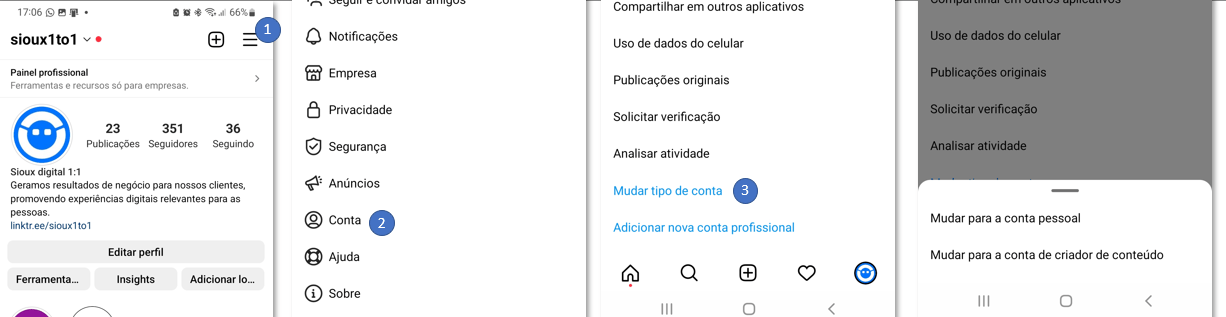
To confirm that your account is a business account, go to the Instagram app on your mobile phone, go to Settings > Account > Click change account type. If it appears exactly like this: "switch to personal account", it is a business account.
Another way is if the "Professional Panel" control appears at the beginning.
Share this content
Latest content

Push marketing data from Pro Plugg and Google Sheets into BigQuery. Calculate true ROI, LTV by channel, and build attribution models. Guide for data teams.
Centralize Meta Ads, TikTok, and Instagram data in one Google Sheet. Multi-tab setup, cross-sheet formulas, one-click refresh. No coding required.
Import Meta Ads, TikTok, and Instagram data into Google Sheets with one click. Saved queries, smart append, custom date ranges. No coding. Try free.
Ready to automate your reporting?
Join data-driven teams who save 10+ hours per week.
NO CREDIT CARD REQUIRED